
Cloudflare Pages, Workers, and everything in between
Notes from digging into how Cloudflare Pages actually works: Workers, edge routing, content-addressable storage, and the primitives nobody explains upfront.
I needed somewhere to host this blog. Free tier, fast, no servers to manage. That search led me to Cloudflare Pages, and what started as a quick deployment setup turned into a full investigation of how the product actually works underneath. This is that investigation, written in the order the questions came up.
TLDR
One-line definitions before the deep dives:
| Term | What it is |
|---|---|
| Worker | JS/TS function that runs at Cloudflare’s edge, on demand, triggered by a request |
| Pages | Git-connected deployment product for static sites, built on top of Workers |
| Static Assets | The native Workers way to serve static files, replacing the legacy Pages model |
| R2 | Object storage like S3 but with zero egress fees |
| Durable Object | A single stateful Worker instance guaranteed to run in one place at a time |
| Anycast | Same IP address announced from every data center, BGP routes each user to the nearest one |
| CAS | Content-addressable storage, files identified by hash so unchanged content never uploads twice |
Why “Pages” is a confusing name
What was Cloudflare Pages when it launched?
Pages launched in December 2020 as a direct competitor to Netlify and Vercel. Connect your GitHub repo, push code, Cloudflare builds your static site and deploys it automatically. No infrastructure to manage, global CDN included.
That was it. A convenience product built on top of Cloudflare’s existing network infrastructure.
So why “Pages” if it means your whole website?
The naming comes from GitHub Pages, which launched in 2008 and has always hosted complete multi-page websites: full Jekyll blogs, full documentation sites. “Pages” in this lineage means web pages in the generic sense, as in a website made of pages.
It reads oddly today because “page” now tends to mean one screen in a single-page app. But when these products were named, that vocabulary hadn’t taken over yet. Your entire Astro blog with every post and every route deploys as one unit. It was always a complete site.
The real primitive: Workers
What is a Cloudflare Worker?
A Worker is a piece of JavaScript (or TypeScript) that runs at Cloudflare’s edge, on demand, only when a request needs it. Not a server you provision. Not a container you manage. You write a function that takes a request and returns a response, upload it, and Cloudflare handles running it wherever requests come in.
The runtime is V8, the same engine that runs Chrome and Node.js. But it’s not running inside a full container or VM. It runs in an isolate: a lightweight execution environment that starts nearly instantly and shares an underlying process with other isolates, kept separate by V8’s own memory boundaries. This is why Workers have no meaningful cold-start problem.
How does a request actually get handled at the edge?
When a request reaches Cloudflare for your site, the edge checks whether it’s a static file first. If yes, it serves it from the edge cache without touching any compute. If no, your Worker code runs.
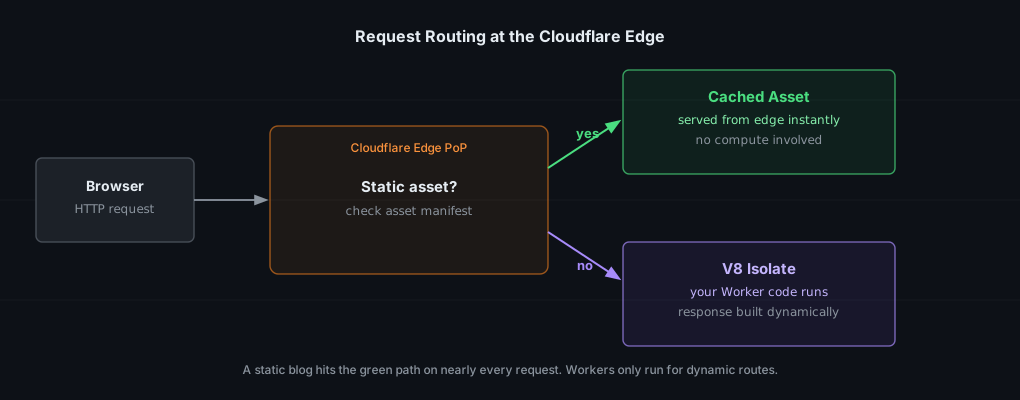
For a static blog, almost every request takes the green path. A Worker only runs if you have dynamic routes: an RSS feed generator, a form handler, anything that needs code to produce a response.
What is Anycast, and why does it matter here?
With a normal server, one IP address maps to one machine. You pick a region and users far away get slower responses.
Anycast is different. The same IP address is announced simultaneously from every Cloudflare data center. Internet routing (BGP) automatically sends each user’s traffic to whichever data center is network-closest to them: not geographically closest, but closest in terms of network hops and latency.
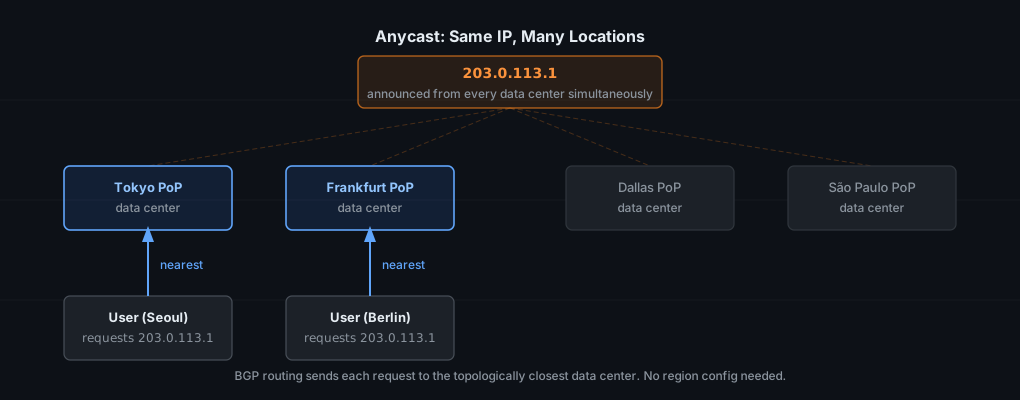
This is why there are no regions to configure in Cloudflare. There’s nothing to pick. The network figures out proximity per request automatically.
The merge: Static Assets
Workers launched in 2017. Pages launched in 2020. What happened in between?
Workers (2017) was a general compute primitive. Pages (2020) was a convenience product for static site hosting built on top of that infrastructure.
In 2021, Cloudflare added Pages Functions to give Pages dynamic capability. The part the docs glossed over: Pages Functions secretly used the Workers runtime underneath from day one. Pages never had its own compute layer.
In 2023 and 2024, Cloudflare started merging them properly. The result is Workers with Static Assets: one deployment unit, one config file, no split between “the site” and “the functions.”
What changed concretely?
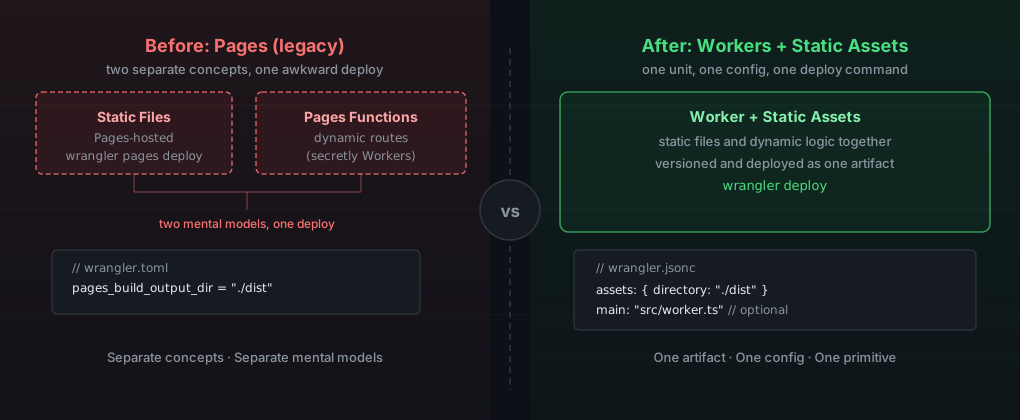
Before: Pages had its own git-connected UI, its own CLI commands (wrangler pages), and Pages Functions bolted on as a separate concept. Two mental models stitched together.
After: One wrangler.jsonc file. One assets key pointing at your build output directory. One optional main key pointing at a JS file for dynamic logic. Deploy with wrangler deploy or connect a GitHub repo for automatic deploys.
For a static Astro blog, you may not need the main key at all.
Is Pages going away?
Not immediately. Cloudflare is still running Pages and its existing projects. But the direction is clear: Static Assets is the native primitive, and Pages is the legacy convenience layer built before that primitive existed. New projects should use Workers with Static Assets directly.
Storage and state
What is content-addressable storage?
A normal filesystem stores files by location. /images/logo.png lives at a path and you overwrite that path when deploying a new version.
Content-addressable storage (CAS) identifies each file by a cryptographic hash of its content. Same bytes produce the same hash. The same file referenced from two different deploys is stored exactly once.
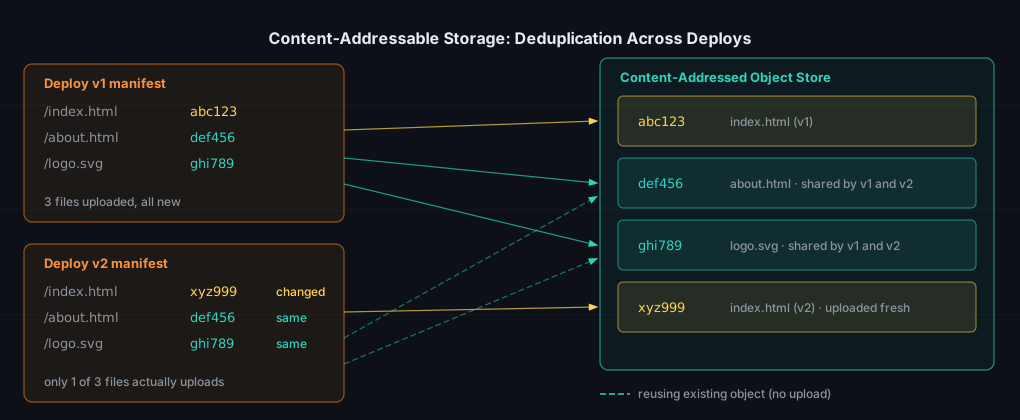
This is what makes Cloudflare’s deploys fast and atomic. A deploy publishes a new manifest: a mapping from URL paths to content hashes. The actual bytes for anything unchanged already exist at the edge from a previous deploy. Only new or changed files upload. Switching live traffic to a new manifest is instant and all-or-nothing. There’s no window where users see half the old version and half the new one.
Are R2 buckets the same as S3 buckets?
Yes, by design. R2 uses the same bucket, object, and key model as S3, and it implements the S3 API surface. You can point an AWS S3 SDK at an R2 endpoint and it works without code changes.
The practical difference is pricing. S3 charges for egress: every byte users download from your bucket costs money. R2 charges zero for egress. For a public site with significant read traffic, that difference adds up fast.
What is a Durable Object?
A regular Worker is stateless. Cloudflare can run your Worker code in any data center, handle a request, and discard that instance. This works for most things.
It breaks down when you need coordinated state: a single shared counter, a chat room where all participants see the same messages, a rate limiter that tracks requests across multiple users.
A Durable Object is a uniquely-identified class instance that Cloudflare guarantees runs as exactly one copy at a time, pinned to one location, with its own attached persistent storage. Every request for that specific object’s ID routes to that same instance. Reads and writes are naturally serialized without distributed locking.
Practical use cases: rate limiters, collaborative editing sessions, WebSocket-based chat rooms, anything requiring consistent state across concurrent users.
Compute depth
Is Cloudflare limited to JavaScript?
The V8 isolate runtime handles JS and TS natively. But there are two more tiers:
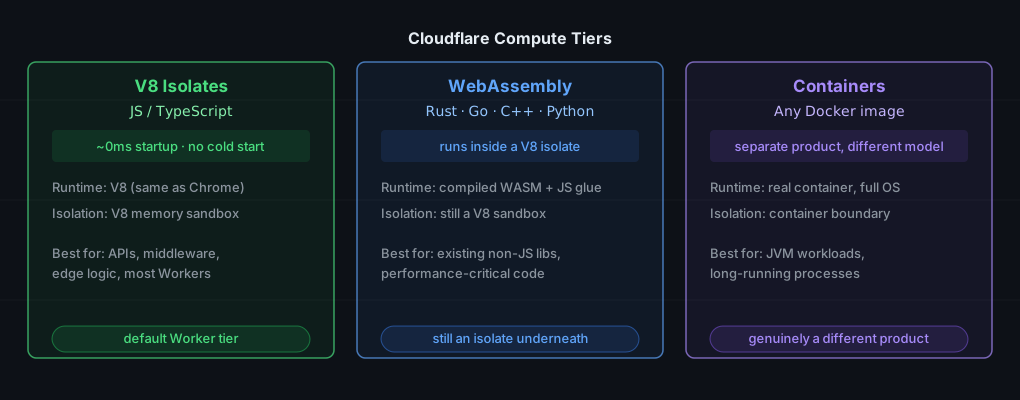
V8 Isolates are the default. JS and TS, fast startup, no cold-start problem. Most Workers run here.
WebAssembly runs inside a Worker as a WASM module called from JS glue code. Rust, Go, C, C++, and Python (via Pyodide) can all compile to WASM and run in this tier. Still an isolate, just executing compiled bytecode instead of interpreted JS.
Containers are a separate, newer product. Real Docker containers with a full OS. Anything that runs in Docker can run here. Different runtime model, different pricing, different use cases: JVM workloads, long-running processes, anything that genuinely doesn’t fit in an isolate sandbox.
For a static Astro blog, none of this applies. If you later add server-rendered pages via @astrojs/cloudflare, that’s the V8 isolate tier.
What are “custom build environments”?
Cloudflare’s build pipeline originally shipped with one fixed environment: a specific Node version, specific preinstalled tools, no way to install system packages. Fine for simple projects, painful the moment you need a specific version of anything.
Custom build environments let you override those defaults: pick your Node version, run setup commands before the build, install system packages. For an Astro project targeting Node 22, this is how you make sure the build environment matches local setup.
Is the modular build pipeline the same as Docker layer caching?
Same motivation, different mechanism. Worth being precise here because conflating them leads to wrong mental models.
Docker layers cache within a single image build. Each instruction produces a layer. Docker reuses a cached layer if that instruction and everything before it are unchanged. One container, linear layers, filesystem snapshots.
Cloudflare’s modular pipeline is closer to a multi-stage CI setup where each stage runs in its own separate container:
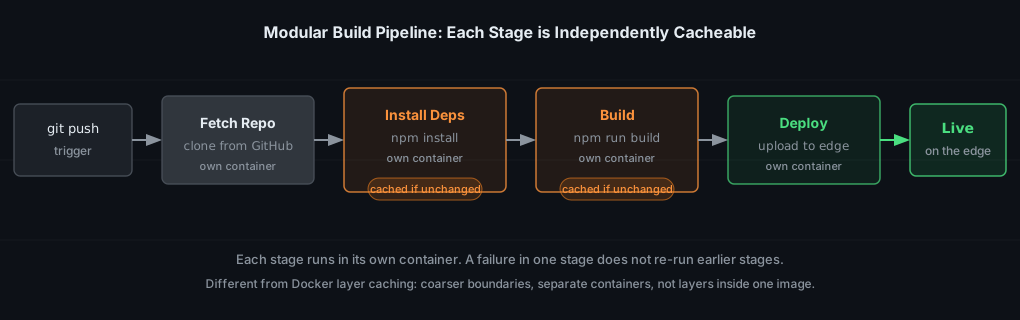
Each stage caches its output independently. If you only changed a blog post’s content, the install-dependencies stage reuses its cache instead of reinstalling every package from scratch. Failure in one stage doesn’t require re-running everything before it.
Same goal (skip redoing unchanged work), coarser boundary (whole stage vs individual instruction), separate containers rather than layers inside one image.
Actually shipping something
What is Wrangler?
Wrangler is Cloudflare’s CLI. It reads your wrangler.jsonc config, which declares your build output directory, bindings (R2 buckets, KV namespaces, Durable Objects), and compatibility date.
How do I deploy from the CLI?
npm install -D wrangler   # install locally
wrangler login            # opens browser to authenticate
wrangler dev              # run locally in an emulated edge environment
wrangler deploy           # push to Cloudflare's network
Before running wrangler deploy, you need a wrangler.jsonc at the root of your project. For a static Astro blog it looks like this:
{
  "name": "learning-blog",
  "compatibility_date": "2026-09-27",
  "assets": {
    "directory": "./dist",
    "not_found_handling": "404-page",
  },
}
Two gotchas I hit on the first deploy:
Empty or malformed wrangler.jsonc throws a cryptic ValueExpected parse error. The message doesn’t tell you the file is the problem, just that it couldn’t parse. If you see that error, check the config file first.
The first deploy asks you to register a workers.dev subdomain. This is account-wide and permanent, not per-project. Whatever you pick becomes your base URL for every Worker you ever deploy on this account. Pick your name or handle, not the current project name.
In my case I registered bagisetti, and my wrangler.jsonc has "name": "learning-blog". Those two combine into the deployment URL: learning-blog.bagisetti.workers.dev. The subdomain is yours forever across all projects; the name field is what changes per project.
Manual CLI vs automatic git-push deploys
CLI deploy is the right starting point: first push, testing config changes, quick iterations. Once the site is working, connect your GitHub repo in the Workers Builds section of the dashboard. Every push to main deploys automatically, and pull requests get preview URLs.
What actually happens after git push
This is where the build pipeline diagram and the CAS section connect:
- GitHub fires a webhook to Cloudflare the moment your push lands
- Workers Builds picks it up and starts the modular pipeline: fetch repo, install deps, build, deploy — each in its own container
- The install and build stages check their cache first. If nothing relevant changed, they skip and reuse the previous output
- The deploy stage compares your new build output against the content-addressed object store. Only files with new hashes upload — unchanged files are already at the edge
- Cloudflare atomically swaps the live manifest to point at the new deployment. No partial rollout, no downtime window
- If the push was to a branch (not main), you get a preview URL instead of touching production
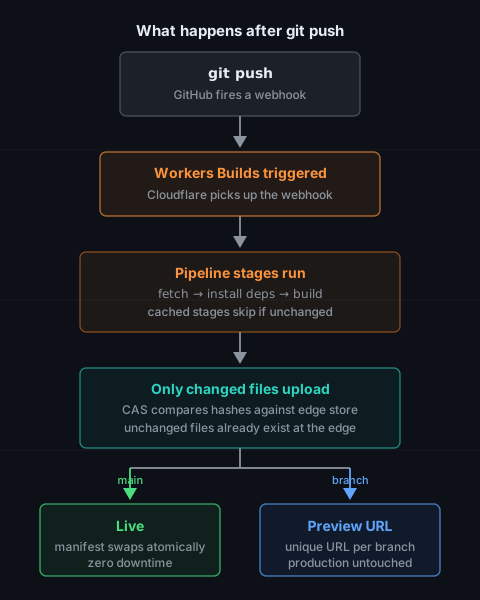
The whole thing typically takes under a minute for a small Astro blog.
For this blog, the build settings are:
| Setting | Value |
|---|---|
| Build command | npm run build |
| Build output directory | dist |
| Node.js version | 22 (set via .node-version file in the repo root) |
Why I chose Cloudflare Pages for this blog
The main alternatives I looked at:
| Option | What it is | Why I didn’t go with it |
|---|---|---|
| Vercel | Git-push deployment, strong Next.js focus | Great product, but optimized for React/Next workflows |
| Netlify | Pioneered this category, similar to Vercel | Solid, but free tier function limits were a concern |
| GitHub Pages | Static hosting directly from a repo | Simple, but no edge CDN and no path to dynamic routes if I ever need them |
| Cloudflare Pages | Static and Workers, global CDN | CDN is Cloudflare’s core product, not a feature add-on |
The deciding factor: CDN is not something Cloudflare bolted on to compete in this market. It’s what Cloudflare is. The static hosting sits on the same infrastructure that handles a significant fraction of the internet’s traffic. That felt like the right foundation for something I want to stay up without maintenance.